Whop Tax Service: what changes for members and sellers
By Wes Calder · Published 2026-10-06
Whop added a Tax Service that works out sales tax and VAT at checkout and can also file it for the seller. Sellers pick one of three setups in the dashboard. The two managed setups cost 2% per transaction. Our new test store was already on the full-service setup. Members may now see tax at checkout.
What changes for members
- Tax shows the way your region expects it: added on top of the price in the US and Canada, already included in the price in the EU and UK.
- When a seller uses one of the managed setups, Whop issues the invoice with the tax rate and amount on it.
- Nothing to turn on. You may now pay sales tax or VAT at checkout on stores that did not charge it before.
What changes for sellers
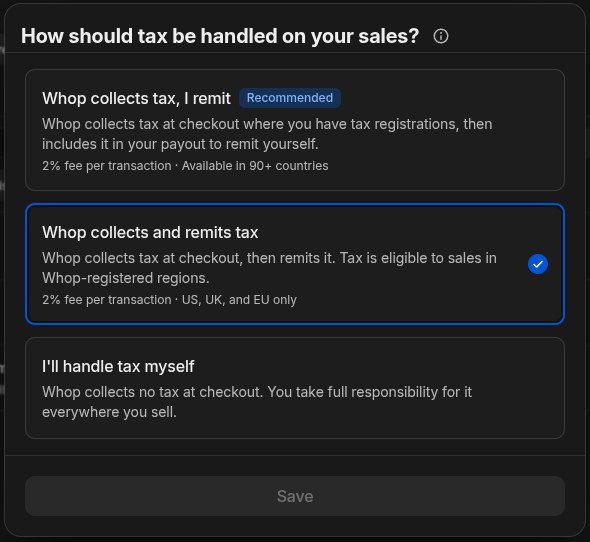
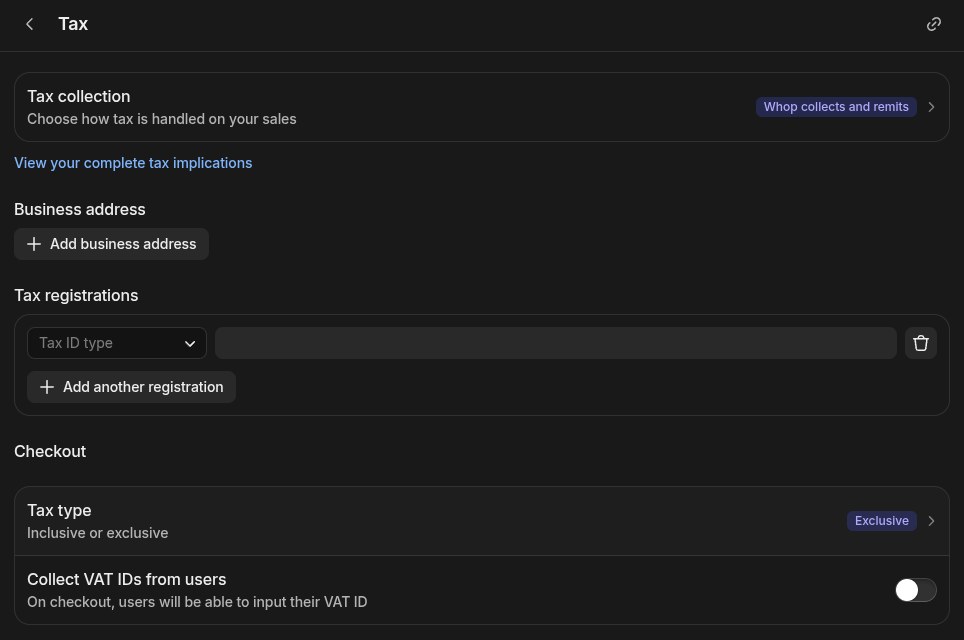
- Three setups sit under Settings, Tax: Whop collects the tax and you file it (marked Recommended), Whop collects and files it for you, or you handle tax yourself.
- No extra software or sign-ups. Tax is worked out at checkout from your details and the buyer's location, and invoices are generated for you.
- Coverage differs. The full service covers the US, the UK and the EU. The collect-only setup lists 90+ countries on the dashboard; the launch post says all US states and territories plus places Numeral supports.
- Both managed setups cost 2% per transaction. On an example $10,000 month that is $200 (our math, assuming the fee applies to the full sale).
- Check your setting. Whop's post says existing businesses start on handling tax themselves, but our new test store was already set to Whop collects and remits, the paid full service. We never picked it.
What we found
- Tax setting already selected on our new test store (we did not choose it): Whop collects and remits tax, 2% fee per transaction (WTJ test store capture)
- Countries listed for the collect-only setup (Whop collects tax, I remit) on the dashboard: 90+ countries (WTJ test store capture)
- Tax Service fee on $1,000 of monthly sales (example amount): $20 (WTJ calculation from F1; math: 2% × 1000)
- Tax Service fee on $10,000 of monthly sales (example amount): $200 (WTJ calculation from F1; math: 2% × 10000)
- Tax Service fee on $50,000 of monthly sales (example amount): $1,000 (WTJ calculation from F1; math: 2% × 50000)
Sources
Introducing Whop Tax Service — Whop's announcement, 2026-06-26.
- Fee for each of the two managed tax options — 2%